Bills without the digging
Forward: Bills from your electricity or phone provider.
Ask Aster: For each bill I forward, tell me the amount, due date and charges I should review. Compare it with the previous bill if I have supplied it.
EMAILYOURPA · EARLY ACCESS
A draft that reads better. Notes that make sense. Help that comes back to your inbox.
Join early-access listJoin the waiting list. We’ll email you when an invitation is available.
AN ILLUSTRATIVE EMAIL EXCHANGE
Leave your name and email.
When you’re invited.
Review the result in the same thread.
Joining the list does not activate an assistant.
MEET THE ASTER FAMILY
Explore the nine levels of working with AI and Aster's focus on automation, computer use and agent coordination. Discover the vision and the current Windows and Linux beta.
FAMILIAR FROM THE FIRST EMAIL
Your inbox already knows how to have a conversation.
Now it has someone to help.
Leave your name and email to join the waiting list.
When invited, get your own assistant email address. Save it as a contact.
Write naturally. Include the details and what a good result looks like.
Receive the result in your email conversation. Review it, reply, and keep a useful copy.
SMALL TASKS. REAL RELIEF.
The draft you’re avoiding. The notes that need order. The decision that needs a second look.
“Please rewrite this politely and briefly: “Send me the revised quote today. We need to decide.””
Could you please send the revised quote today? We’d like to make a decision. Thank you.
Illustrative requests and results, not customer testimonials.
LET THE RIGHT EMAILS COME TO YOUR PA
A rule in your email app can automatically forward selected messages to your own Aster PA address. Choose a sender or subject, then agree what you want Aster to do with those messages. Less forwarding by hand. More useful help from the email you already receive.
During beta, ask Aster to confirm support for your forwarding method and recurring instructions, then test one message together before relying on the rule. The examples below are requests to discuss, not automatically activated services.
Forward: Bills from your electricity or phone provider.
Ask Aster: For each bill I forward, tell me the amount, due date and charges I should review. Compare it with the previous bill if I have supplied it.
Forward: Subscription renewal and price-change notices.
Ask Aster: Explain what is renewing, the new price and any cancellation deadline stated in the email. Help me decide what to keep.
Forward: Booking confirmations and airline or hotel updates.
Ask Aster: Summarize the booking details and explain what changed. Tell me what I need to check with the provider.
Forward: Selected messages from your school or activity organizer.
Ask Aster: Pull out dates, things to bring and forms I need to return. Give me a short checklist.
Forward: Order confirmations and receipts from chosen shops.
Ask Aster: Extract the merchant, date, amount and order number. Flag any return deadline stated in the message.
Forward: Selected customer inquiries or supplier quotes.
Ask Aster: Summarize the request, list missing details and draft a reply for me to review and send.
From your registered email address, describe which messages you want to forward and the result you want. Confirm the supported setup, where replies go and whether you need a separate reminder or digest.
In your email provider, select a known sender, subject or other condition. Use the personal PA address from your welcome email, not our general information inbox. Keep your own copy of the messages.
Complete any forwarding-address verification with Aster’s help. Send a harmless matching message and check that your PA processes it and the result comes back to you. Check that unrelated messages stay out.
Review the first few results. Edit or disable the forwarding rule in your email settings whenever you want. Separately ask Aster to cancel any agreed reminders or recurring work you no longer need.
Forward only what you want processed. Exclude passwords, sign-in codes and unrelated sensitive information. Forwarding a message does not authorize a payment, cancellation, booking or reply to its original sender.
Official setup help: GmailOutlookiCloud Mail
Your provider or workplace may restrict forwarding. Forwarding and redirecting can identify the sender differently, so confirm which method works with your PA. Email is not an emergency-alert channel.
Already have an Aster address? Ask your PA which forwarding rule would help you most. New here? Join the early-access list.
Get early accessWRITE NATURALLY
Everyday requests, bigger projects, and ideas for what comes next. Describe the result you want, as you would to a capable human assistant.
These examples show our product vision, not a list of features available today. The beta starts with writing, editing, comparisons and organizing information you provide. File and media processing, reminders, monitoring, spending limits and private or regional AI options are not generally available; your invitation confirms your access.
Aster, remind me tomorrow morning to call the dentist.
Aster, here's my shopping list. Organize it by supermarket section.
Aster, compare these three phone bills and tell me which plan costs me least.
Aster, I attached my electricity bills from the last year. Show me how my usage changed.
Aster, find me five good birthday gifts for my father under $100.
Aster, research robot vacuum cleaners and recommend the best one for a house with cats.
Aster, I'm moving next month. Make me a checklist and remind me about important deadlines.
Aster, here's a photograph of this appliance. Find out what it is and explain how to use it.
Aster, explain this letter I received in ordinary language.
Aster, compare these two insurance offers and show me the important differences.
Aster, I have $500 available for a new laptop. Research the best options.
Aster, monitor the price of this product and tell me if it drops below $400.
Aster, find the instruction manual for this old device and explain the controls.
Aster, I attached five receipts. Put the expenses into categories and give me a table.
Aster, turn these handwritten notes into a clean document.
Aster, research HAM radio satellites we can currently use and send me a PDF.
Aster, investigate both sides of this claim and tell me what the evidence actually supports.
Aster, research this company before my meeting tomorrow.
Aster, find the original scientific studies behind this news story.
Aster, research the history of this archaeological site using reliable sources.
Aster, compare what these five sources say and identify where they disagree.
Aster, investigate this subject thoroughly. Use Premium AI if necessary, but don't spend more than $2.
Aster, find everything publicly available about this technology and prepare a briefing.
Aster, research the competitors in this industry and make a comparison table.
Aster, find the strongest evidence for and against this hypothesis.
Aster, research this topic but prioritize primary sources over news articles.
Aster, give me a five-minute explanation first. If it looks interesting, I'll ask for the full report.
Aster, research this in Turkish, German and English sources rather than relying only on English results.
Aster, update the report you prepared last month using information published since then.
Aster, summarize this 80-page PDF in two pages.
Aster, explain this contract to me without legal jargon.
Aster, compare these three contracts and make a table showing the differences.
Aster, read all six attached documents and tell me where they contradict one another.
Aster, rewrite this document professionally without changing its meaning.
Aster, translate this document into German while preserving the structure.
Aster, extract every deadline mentioned in these documents.
Aster, find every place in this report where the numbers don't agree.
Aster, turn these notes into a polished report and send it back as a PDF.
Aster, make an executive summary for somebody who only has three minutes to read it.
Aster, analyze this document, but clearly separate what the document says from your own interpretation.
Aster, find all references to Project Apollo across these 20 files.
Aster, read these proposals and rank them against the requirements in this other document.
Aster, create a list of questions I should ask before signing this agreement.
Aster, analyze this workbook and tell me what's important.
Aster, compare every sheet, including hidden sheets.
Aster, find unusual changes in these monthly sales figures.
Aster, explain these formulas and tell me which numbers depend on them.
Aster, compare this year's spreadsheet with last year's.
Aster, find duplicate entries.
Aster, turn these CSV files into a readable management report.
Aster, identify the ten biggest expenses.
Aster, calculate the trend but don't modify the original spreadsheet.
Aster, compare these three price lists and tell me the cheapest supplier for each item.
Aster, analyze these survey results and summarize the major patterns.
Aster, make charts from this data and send me a PDF report.
Aster, transcribe this recording exactly. Don't clean up my words.
Aster, summarize this recording. I don't need the transcript.
Aster, give me a summary for every ten minutes of this recording.
Aster, transcribe it and then give me a separate summary.
Aster, clean up this transcript by removing filler words, but don't change the meaning.
Aster, extract all decisions and action items from this meeting.
Aster, tell me every point where somebody mentions the budget.
Aster, translate this Turkish recording into an English transcript.
Aster, listen to these four recordings and produce one combined report.
Aster, find the section where they discuss the delivery date.
Aster, turn this interview into a readable article.
Aster, summarize this lecture into study notes.
Aster, tell me what is happening in this photograph.
Aster, read this chart and explain the important trend.
Aster, compare these two product photographs.
Aster, remove the background from this image.
Aster, make this photograph suitable for a professional profile.
Aster, create an illustration for this report.
Aster, turn this rough sketch into a polished diagram.
Aster, create three different cover concepts for this document.
Aster, resize this image for social media without cropping the important part.
Aster, improve this old photograph while keeping it natural.
Aster, create an infographic from the attached report.
Aster, analyze these photographs and prepare a visual inventory.
Aster, watch this two-hour video and summarize it.
Aster, give me a summary every ten minutes.
Aster, transcribe the entire video.
Aster, summarize the video but don't send me the transcript.
Aster, create chapters and timestamps.
Aster, find every point where they discuss pricing.
Aster, extract the major decisions from this meeting video.
Aster, create English subtitles for this Turkish video.
Aster, translate these subtitles into German and Spanish.
Aster, find the five most important moments in this presentation.
Aster, extract representative frames from each major scene.
Aster, turn this webinar into a written report.
Aster, create a short highlight video from these clips.
Aster, make a 30-second promotional version of this video.
Aster, create a short video explaining this product using the attached material.
Aster, plan a four-day trip to Rome for two people under €1,500.
Aster, compare these hotels and recommend the best one.
Aster, research the neighborhoods before I choose where to stay.
Aster, create a day-by-day itinerary but don't overbook us.
Aster, find interesting restaurants near our hotel.
Aster, compare train versus flying for this trip.
Aster, watch the weather forecast and tell me if I should change our outdoor plans.
Aster, summarize the important information in these booking confirmations.
Aster, make me a packing list based on the destination and forecast.
Aster, translate this restaurant menu and explain unfamiliar dishes.
Aster, organize all these travel confirmations into one itinerary.
Aster, remind me 24 hours before online check-in opens.
Aster, find the best washing machine under €600.
Aster, don't just compare specifications—check what owners complain about.
Aster, compare these five products and recommend one.
Aster, find something equivalent but cheaper.
Aster, watch this product and tell me when it goes on sale.
Aster, research whether this suspiciously cheap product is genuine.
Aster, find this replacement part from the photograph.
Aster, compare total ownership costs rather than just purchase prices.
Aster, find winter boots in size 46 that can handle -15°C.
Aster, I care more about reliability than features. Recommend accordingly.
Aster, identify this warning light from the photograph.
Aster, explain this repair estimate and tell me what each item means.
Aster, compare these replacement parts.
Aster, research common problems with this car model.
Aster, make a maintenance schedule for my vehicle.
Aster, remind me when the next oil change is due.
Aster, read this workshop manual and explain the procedure.
Aster, compare these tire specifications.
Aster, analyze this strange sound from the recording and tell me what possibilities I should investigate.
Aster, keep a maintenance history from the receipts I send you.
Aster, prepare me for tomorrow's meeting using these documents.
Aster, turn these meeting notes into action items.
Aster, compare these supplier proposals.
Aster, research this potential customer before I call them.
Aster, analyze these customer complaints and identify recurring themes.
Aster, turn this technical report into something management can understand.
Aster, prepare a presentation outline from these documents.
Aster, draft a professional response to this email.
Aster, summarize everything that changed between version 4 and version 5.
Aster, research competitors and make me a SWOT-style briefing.
Aster, convert these scattered notes into a project plan.
Aster, identify unresolved questions across these meeting transcripts.
Aster, produce a weekly report from the files I send you.
Aster, proofread this without changing my voice.
Aster, make this more professional.
Aster, make this easier for ordinary people to understand.
Aster, shorten this to 500 words.
Aster, expand these notes into an article.
Aster, compare these two drafts and explain what changed.
Aster, translate this while preserving the tone.
Aster, check this manuscript for inconsistencies.
Aster, turn this research into a chapter but distinguish established facts from speculation.
Aster, make a bibliography from these sources.
Aster, prepare an Amazon description for this book.
Aster, turn this article into a presentation.
Aster, teach me calculus without assuming I remember high-school mathematics.
Aster, explain this scientific paper like I'm an intelligent non-specialist.
Aster, create a study guide from these lecture notes.
Aster, quiz me on this PDF.
Aster, explain every answer I get wrong.
Aster, make flashcards from these chapters.
Aster, create a four-week learning plan for this subject.
Aster, compare these competing scientific theories.
Aster, find reputable introductory material before giving me advanced material.
Aster, explain this in Turkish, but keep the important English technical terms.
Aster, tell me when this product becomes available.
Aster, let me know when the price drops below $500.
Aster, watch for an official announcement about this release.
Aster, tell me when registration opens.
Aster, remind me three days before this expires.
Aster, check this every morning and tell me only if something changes.
Aster, watch this public page and alert me if the date changes.
Aster, tell me when the official results are published.
Aster, watch this issue and don't bother me unless there is a meaningful development.
Aster, remind me next month to revisit this decision.
Aster, handle this using the cheapest suitable AI.
Aster, use Premium AI for this one.
Aster, don't spend more than $1 on this request.
Aster, this document is sensitive. Use my Private processing option.
Aster, process this only through providers eligible for European processing.
Aster, don't send this document to providers that process it in China.
Aster, use my self-hosted AI for the first pass and escalate only if necessary.
Aster, tell me how much this job is likely to cost before you start.
Aster, use the best available model. Cost isn't important for this one.
Aster, use Economy mode unless the result fails your quality checks.
Aster, research these three companies, read the attached financial reports, compare them, and send me a PDF.
Aster, watch this two-hour meeting, make a transcript, identify decisions, compare those decisions with our project plan, and send me the discrepancies.
Aster, research this product, compare prices, summarize reviews, and notify me if the best option drops below €700.
Aster, read these contracts, research the companies involved, identify the major differences and prepare questions for tomorrow's meeting.
Aster, analyze this spreadsheet and these invoices together and explain why our expenses increased.
Aster, translate this video, create subtitles, make a written summary and prepare a five-slide presentation.
Aster, research this subject thoroughly, create a report and an infographic, and use Premium AI only for the difficult parts.
Aster, summarize these 20 files, identify contradictions, research anything that appears outdated, and send me one consolidated report.
Aster, plan this trip, monitor the weather, organize my confirmations, and remind me when check-in opens.
Aster, investigate this technical problem using the attached logs and screenshots, research possible causes, rank the explanations and prepare a troubleshooting plan.
Aster, analyze this hour-long interview, extract the strongest quotations, write an article from it and create a suitable header image.
Aster, research this investment sector, analyze these supplied company reports, clearly separate facts from interpretation, and prepare a briefing.
Aster, I don't know which AI is best for this. Choose everything for me, but keep the total processing cost below $3.
Aster, this is confidential. Use only my approved regional/private providers, even if it costs more.
Aster, do the cheap processing locally, use external search for current information, and call Premium AI only if the local model can't produce a reliable answer.
“Aster, I need help with this. Figure out what needs to be done.”
That is where we want to get: you describe the outcome, while Aster chooses the search engine, AI, reasoning level, tools, media processors, privacy route and output format needed to accomplish it.
HELPFUL, WITH BOUNDARIES
Hand off the thinking and drafting. Keep control of the decisions that matter.
AI can make mistakes. Review important answers before relying on them. Don’t email passwords or highly sensitive information.
EARLY ACCESS
Join the early-access list.
We’re starting small and learning from real tasks.
YOUR PERSONAL ASSISTANT HAS AN EMAIL ADDRESS
Send the task. Get the work back.
Your AI personal assistant, by email.
No new app to learn. No dashboard to check. Just email.
THE IDEA, IN MOTION
Some work is best discussed live.
Other work is better handed over.
Concept films in English. Screens and addresses are illustrative, not instructions for using the service.
A woman sends a project document from her laptop, continues her day, and checks a reply on her phone.
USEFUL BEYOND THE NEXT REPLY
Ordinary answers already delivered to your mailbox stay in the correspondence you keep. Save, search or forward your received copies using the email tools you know.
Use your usual email account. Tell your PA what you need and what a useful result looks like.
When a supported task returns an attached file, download and archive the actual file. Hosted links can have separate access and expiry limits.
Choose what to share, review important results, and keep control of consequential decisions.
THE BIGGER PICTURE
A familiar way to delegate useful work—and a longer-term vision for follow-through and selected personal history.
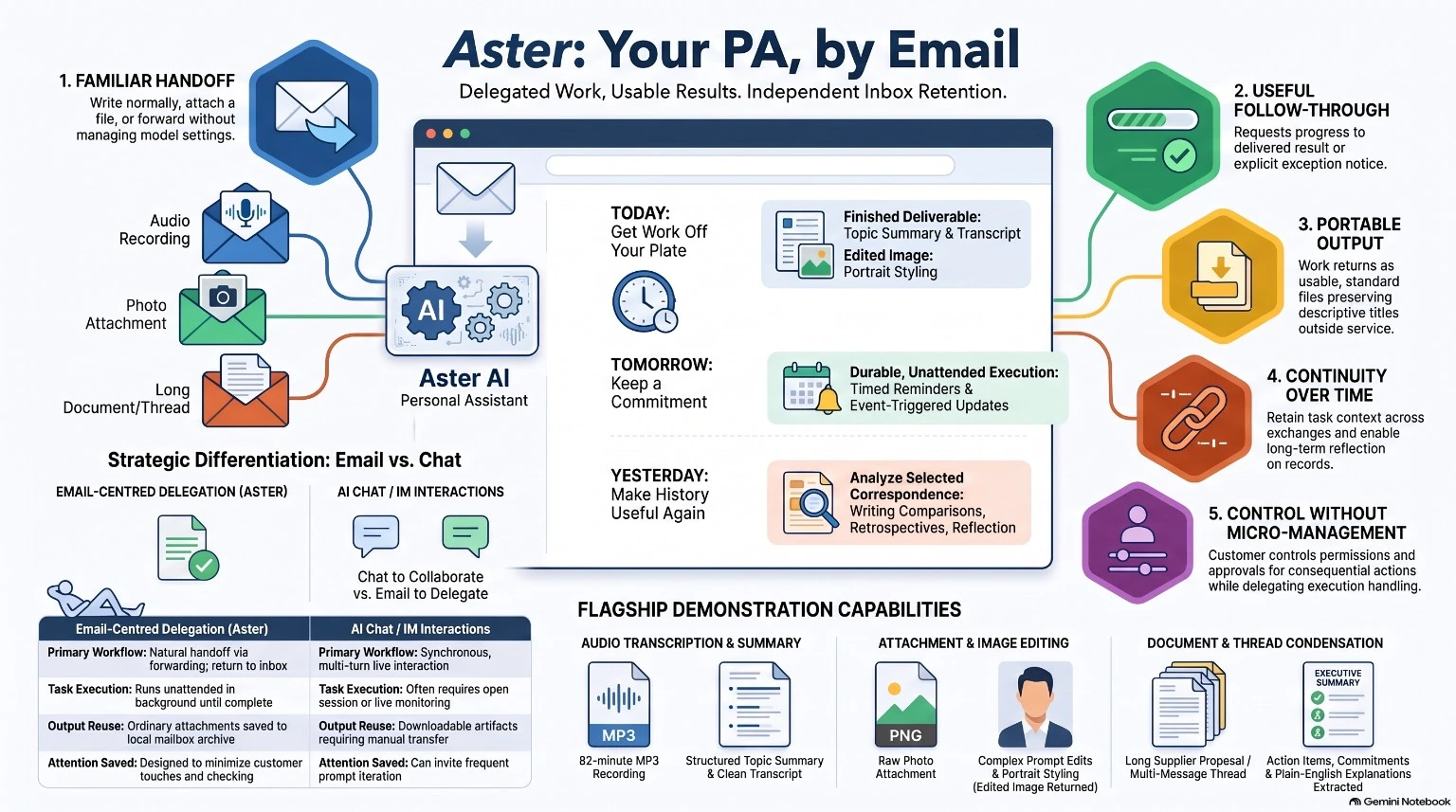
Tested in early pilotsWriting, email replies, recording transcription and an image edit have been tested in limited trials. Availability varies by beta invitation.
Still being developed and evaluatedReminders, automatic follow-ups and help with selected older emails are future possibilities, not current beta commitments.
A FEW GOOD QUESTIONS
General questions: info@emailyourpa.com
Questions about Aster? Email us in your preferred language. This is our information inbox, not a personal PA address.
No. Once you’re invited to the beta, you’ll receive a dedicated PA email address. Use the email app you already have and reply in the same conversation.
Start with writing, editing, comparisons and organizing information you provide. Your invitation will explain any additional file or media support. Scheduled reminders and connected account actions are not generally available.
No. Purchases, financial commitments, account changes, data deletion and credential disclosure are unavailable in this beta. Future consequential actions will need explicit approval and appropriate safeguards.
You join the waiting list. We’ll contact you when an invitation is available. Your personal PA address comes after activation, not when you submit this form.
We use your signup details to review your beta request and contact you about onboarding. Don’t include passwords or sensitive documents in the form. During the beta, requests sent to your PA are processed by our email and AI service providers.
We collect page views, approximate visits, referral domains, language, country, device category, tagged campaign sources and active time. Random browser and session identifiers estimate returning visits using local storage, without linking visitors to signup identities. Browser identifiers expire after 180 days. Analytics uses no tracking cookies and stores no raw IP addresses, full referring URLs or form contents. It respects Do Not Track and Global Privacy Control. Statistics and pseudonymous session records are kept for up to 180 days; duplicate-prevention records expire after 48 hours. Visitor and signup locations may include approximate country, state or region, and city derived from the connecting IP by our hosting provider. We do not store raw IP addresses or exact coordinates. These estimates may reflect a VPN or network location rather than your actual location. Signup location is visible only in the protected operator dashboard.
Chat can be great for live exploration and quick iteration. Aster is designed for supported work you want to hand over and receive back in your correspondence. Use whichever fits the task.
Yes. Keep the answers and download any files delivered to your mailbox. Save your own copies of linked files before their access expires.
No. These are concept films and a product-vision infographic. Some features shown are still being developed. Your beta invitation explains what you can use.