Skip to content
asterGet started

THE ASTER VISION

Your AI,
put to work.

Give the AI you choose somewhere to work, a way to start when it is needed, and the ability to coordinate with other agents. Aster concentrates on levels 7, 8 and 9: automation, computer use and agent coordination.

This page explains our product direction. Current availability is described separately below.

A PRACTICAL FRAMEWORK

Nine ways to put more of AI to work.

A conversation can help you think through a problem. Add context, repeatable methods and useful tools, and the kinds of work you can delegate expand. The nine levels below describe that progression in everyday terms.

These capabilities overlap. This is our educational framework, not an official ranking or a compulsory sequence. Choose the capabilities that help with your task.

THE NINE LEVELS

From asking a question to coordinating the work.

Open a level to explore what changes, a practical example and the benefit it can bring.

01ChatAsk questions, explore ideas and get explanations.

You initiate a conversation and use the response to move your thinking forward. AI can help explain a subject, draft text, compare options or reason through a problem. Choosing a more capable model may improve the response; you still decide when to ask and what to do next.

EXAMPLE INSTRUCTION
Explain this proposal in plain language and help me identify the questions I should ask.

WHAT YOU GAINA thinking and writing partner available when you need one.

02Context & memoryGive AI your goals, preferences and project background.

Project files, saved instructions and available memory give the assistant relevant context. You can supply a business brief, a style preference or an ongoing plan so the work is less generic. What persists depends on the product and its settings; important project information should remain in an accessible record.

EXAMPLE INSTRUCTION
Use this project brief, our audience description and my writing preferences when preparing the next draft.

WHAT YOU GAINMore relevant work and less time repeating the basics.

03SkillsApply reusable instructions and methods to recurring work.

A skill packages a way of working: instructions, examples, templates and sometimes scripts. It gives the agent a repeatable process to follow when the task fits. You can capture your own method or use a skill from a trusted source. The skill guides execution; it does not permanently retrain the underlying model.

EXAMPLE INSTRUCTION
Follow our research process: define the question, examine the sources, record uncertainty and prepare a referenced brief.

WHAT YOU GAINYour standards become a reusable part of the workflow.

04ConnectionsWork with information and actions in connected services.

Connectors, plugins and APIs provide supported access to external tools. Depending on the integration and permissions, an agent may retrieve documents, read a record or update information in a business application. A connection exposes specific capabilities; it does not automatically provide every feature of that service.

EXAMPLE INSTRUCTION
Find the latest project document in the connected workspace and update the task record with the agreed next step.

WHAT YOU GAINLess copying between a conversation and the tools where your information lives.

05CreationTurn a brief into a presentation, document or visual.

With suitable creation tools, AI can produce a deliverable you can inspect and refine: a slide deck, a report, an image, a chart or an animation. The useful step is turning your intent into an editable or shareable result. You provide the audience, purpose and feedback that shape the finished work.

EXAMPLE INSTRUCTION
Turn this research into a ten-slide presentation for a general audience, with clear charts and speaker notes.

WHAT YOU GAINAn idea becomes a tangible piece of work you can review and use.

06BuildingDevelop websites, apps, dashboards and internal tools.

Describe the behavior you want in ordinary language. A coding agent can help implement it, run checks and revise the result. You can begin without programming experience, while clear requirements, realistic scope and testing remain essential. A convincing preview is a starting point for checking that the actual behavior works.

EXAMPLE INSTRUCTION
Build a dashboard for these project milestones, then check the filtering, mobile layout and saved data.

WHAT YOU GAINA shorter path from a software idea to something you can try and improve.

ASTER FOCUS · LEVELS 7–9
07AutomationAster focusStart defined work from supported schedules or events.

You agree on a task and the condition that should start it. A schedule might prepare a weekly briefing; an event might launch a workflow when a file arrives. The system needs an available runtime, the required access and a place to deliver the result. Aster's goal is to carry that assignment through its lifecycle and make failures visible.

EXAMPLE INSTRUCTION
Every Monday morning, prepare my competitor update from current sources and save the report in my project folder.

WHAT YOU GAINRecurring work can begin without another prompt from you.

08Computer useAster focusCarry out tasks with connected computers and supported software.

An agent needs tools that can act in the working environment. Those may include commands, file operations, browser automation or desktop controls with screen feedback. Aster Universal MCP provides a foundation for authorized computer access; broader application workflows require suitable tools and individual checks. The intended loop is to observe the state, take an action and check its effect.

EXAMPLE INSTRUCTION
Use the approved files and applications to update my spreadsheet, prepare the presentation and export the finished files.

WHAT YOU GAINUseful work happens in the environment where you already keep your files and tools.

09Agent coordinationAster focusOrganize compatible agents across providers and machines.

A coordinating agent can divide a larger job, assign responsibilities and combine results. Independent tasks may run in parallel; dependent tasks need orderly handoffs. Our vision includes cooperation between a ChatGPT agent, a Claude agent and workers on connected computers, where the respective integrations support it. Aster should preserve ownership, progress and evidence throughout the assignment.

EXAMPLE INSTRUCTION
Have one agent research the topic and another prepare the deliverable, then review their work against the original requirements.

WHAT YOU GAINSpecialist help contributes to one tracked assignment and a checked final result.

WHERE ASTER CONCENTRATES

The last three levels belong together.

Automation determines when work starts. Computer access gives it somewhere to happen. Coordination keeps responsibilities, handoffs and results connected. Our aim is a dependable path from your instruction to useful completed work.

07

Automation

Work starts when it is needed.

A supported event or schedule becomes a durable assignment with a clear goal and a destination for its result.

  • Record the trigger and the requested outcome.
  • Deliver the assignment to the intended receiver.
  • Track progress and make a blocked or failed job visible.
08

Computer use

Your tools become the working environment.

Use the connected machine and software appropriate to the job, within the access you grant.

  • Keep inputs and outputs in known locations.
  • Use commands, APIs or interface controls as appropriate.
  • Check that the expected file or change actually exists.
09

Agent coordination

Agents work toward the same result.

Bring in additional agents when their capabilities help, with explicit responsibilities and useful handoffs.

  • Give each task one clear owner at a time.
  • Preserve context and progress across interruptions.
  • Review outputs against the original requirements.

PRODUCT VISION · CAPABILITIES DEPEND ON THE RELEASE AND INTEGRATION

SEE THE VISION IN PRACTICE

One instruction. A complete workflow.

Choose a scenario to see how levels 7, 8 and 9 can fit together.

YOUR INSTRUCTION

Every Monday morning, prepare my competitor update and refresh the presentation for our team meeting.
  1. 01

    Start from the schedule

    Create the assignment with its scope, deadline and output folder.

  2. 02

    Research with sources

    A research agent gathers relevant changes and records where each claim came from.

  3. 03

    Prepare the files

    A worker updates the spreadsheet and presentation using connected tools.

  4. 04

    Review and deliver

    Check the figures, sources and requested sections, then return the files and unresolved questions.

THE RESULT TO CHECK

A dated report, an updated presentation and supporting sources, with any remaining uncertainty identified.

Illustrative target workflows. Each requires compatible integrations and a system that can run the agent; these examples are not promises of current beta functionality.

WHAT GOOD COMPLETION LOOKS LIKE

Progress you can inspect. Results you can check.

Our design standard is that every delegated job should be able to answer these questions.

Who owns the work?

An identifiable agent or worker is responsible for each assignment, with clear handoffs.

What actually happened?

Recorded actions and outputs show progress, with blockers reported explicitly.

Can it continue?

Saved context and checkpoints support recovery after an interruption.

What proves it is finished?

The requested result exists and has been checked against the agreed requirements.

THE ASTER FAMILY

A familiar way to ask. A place to do the work.

Aster PA and Aster Universal MCP serve different parts of the broader direction. Their current offerings and access requirements are described on their respective pages.

YOUR ASSISTANT, BY EMAIL

Aster PA

A familiar way to request help through the email app you already use. The PA service has its own early-access onboarding, availability and operating boundaries.

Explore Aster PA

YOUR AI, YOUR COMPUTER

Aster Universal MCP

Connect compatible AI clients to a computing environment you control. The published Windows and Linux technical beta supports permission-controlled commands, file transfers and host background jobs.

Downloads and setup

What does MCP mean?

Model Context Protocol is an open protocol for connecting AI models to external tools, data sources and systems. Aster Universal MCP uses that connection to expose supported computer tools. Schedules, desktop control and agent coordination each need their own supporting components.

CURRENT AVAILABILITY

A working foundation. A larger direction.

Published technical beta

The Windows and Linux releases provide OAuth pairing, permission-controlled commands, file transfer and background host jobs. Installation and startup are technical and manual. Follow the current release guide, including local administrator approval and the permission information reported by the client.

Read the current release and installation guide
The broader product vision

Reliable event-driven assignments, application workflows, recovery and coordination across AI providers are areas of development and integration. Their availability must be verified for the specific release, client and environment. A running computer job alone does not keep an AI conversation reasoning or wake an idle agent.

Aster Universal MCP is open-source donationware under Apache License 2.0. Voluntary donations support development. AI-provider, hardware and hosting costs may be separate.

KEEP THE BIG PICTURE

All nine levels, at a glance.

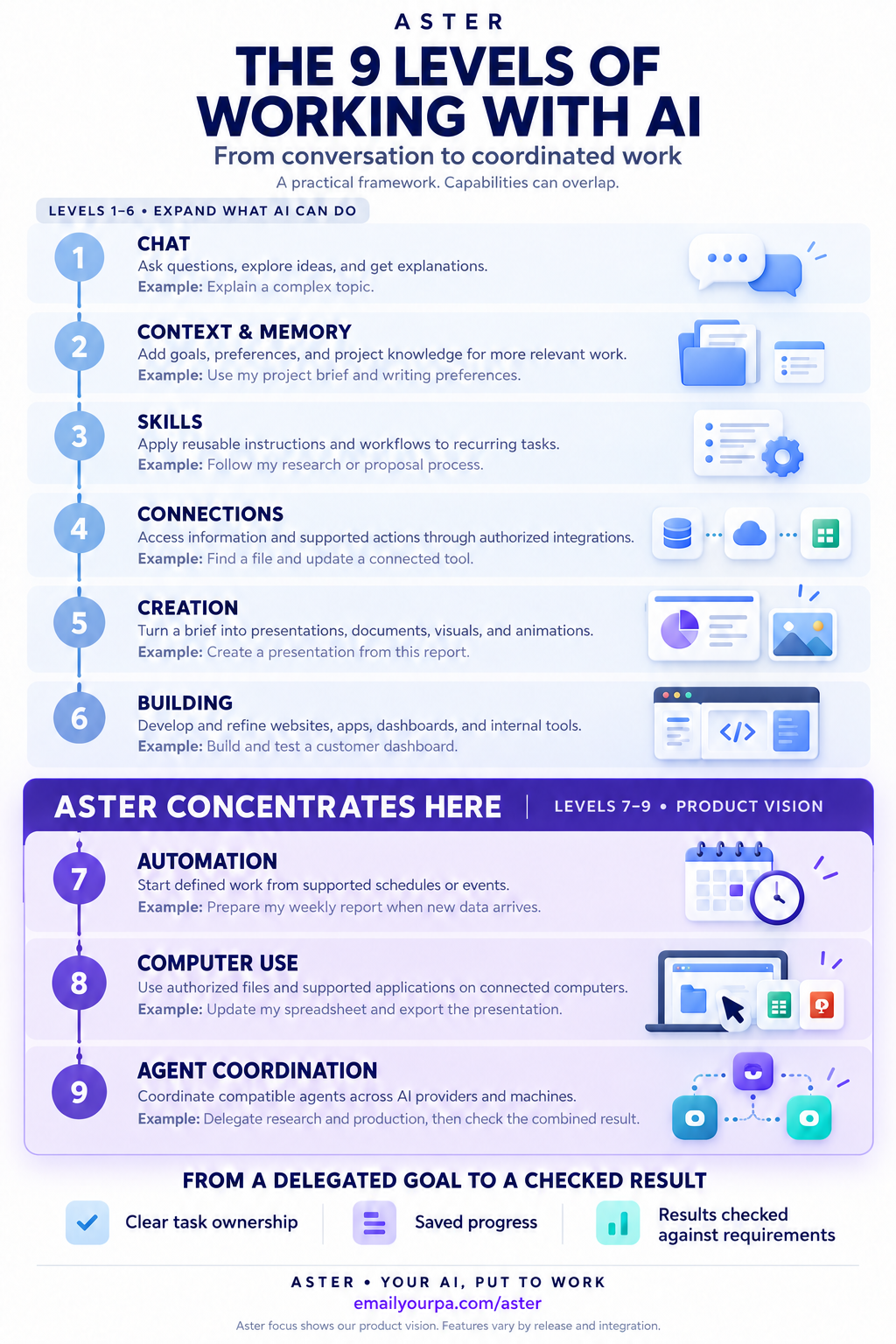
A visual guide to the framework and the part of it Aster is concentrating on. Open the full-size version to read, save or share it.

  1. 7Automation
  2. 8Computer use
  3. 9Agent coordination
The nine levels of working with AI, with Aster's focus highlighted at levels seven, eight and nine.
emailyourpa.com/aster

Questions worth asking.

Do I need all nine levels?

No. They are overlapping capabilities, not a score or a required ladder. A well-designed recurring workflow may be all you need. Additional agents should help the task rather than add unnecessary coordination.

Will Aster work with every AI provider and application?

Compatibility depends on the client's tools, authentication, runtime and permissions. Cross-provider cooperation is part of the vision. Each integration and application workflow needs verification; the current beta does not promise universal support.

Can work continue while I am offline?

A host job can run while its computer remains available. A full AI workflow also needs a supported agent runtime, connectivity where required and any necessary approvals. Closing a chat does not by itself establish that an idle AI session can resume automatically.

Do I need to know how to code?

The goal is to let people express useful work in ordinary language. The current Universal MCP beta still requires technical installation and host administration. The setup page explains the actual prerequisites for Windows and Linux.

How do I keep control?

Choose the machines, clients and access you authorize. The current technical beta can run powerful commands, so its permissions matter. Our coordination direction adds clear ownership, checkpoints and inspectable results; consequential actions need the appropriate authorization.

Where should I start today?

Explore the PA service if you want help through email. If you are ready to administer a host, read the Universal MCP beta's installation and release guide. Start with a bounded task whose output you can check, then expand as the workflow proves useful.

PUT A USEFUL TASK FIRST

What would you hand over next?

Start with a clear goal and an outcome you can inspect. Explore the current services, or help shape the next stage of Aster.

Support the project